In brief
Shortlist the FR3 when the complete tool and part package and the required poses fit its documented operating envelope. Shortlist the FR5 when the application needs its greater nominal payload or reach, then require the supplier to demonstrate the actual job before choosing either model.
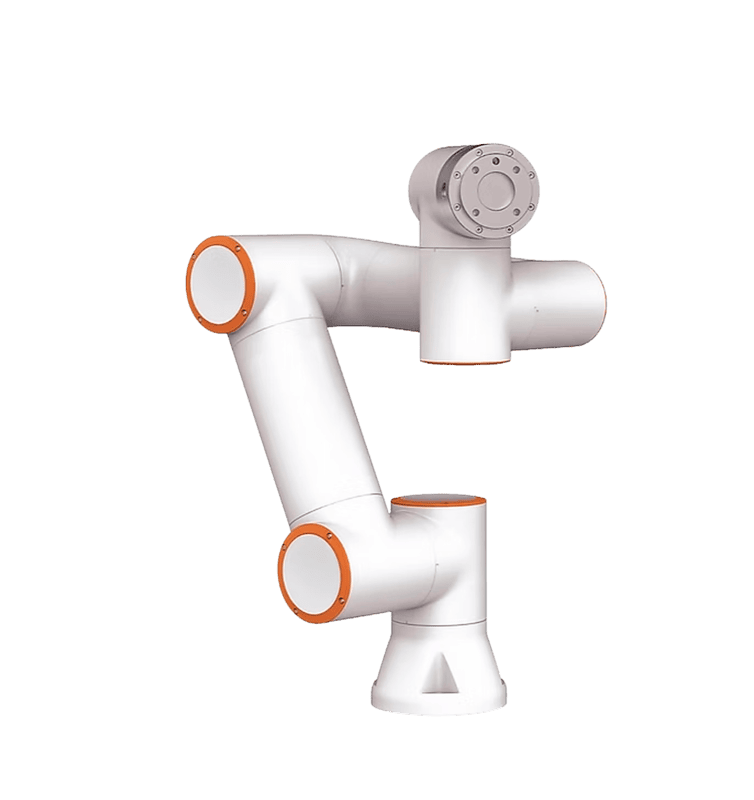
Compare the right baselines
FAIRINO lists the FR3 at a nominal 3 kg payload and 622 mm reach, and the FR5 at a nominal 5 kg payload and 922 mm reach. These are useful screening facts, not promises that any tool can move through every desired pose. The product pages also show higher maximum loads. Treat those entries as questions for application qualification, never as substitute nominal ratings.
Begin with an equipment identity sheet: exact arm variant, mounting arrangement, controller offered and intended process. Ask each supplier to quote against the same sheet. Otherwise, a comparison can quietly become a contest between different tool packages, different software options and different assumptions about the operator. Keep unsupported statements in an open-questions column until someone supplies evidence that applies to the proposed configuration. A brochure for a related variant should not silently close that question.
| Screening criterion | FR3 | FR5 | What this does not establish |
|---|---|---|---|
| Nominal payload | 3 kg | 5 kg | Suitability of your offset tool and workpiece during motion |
| Listed reach | 622 mm | 922 mm | A collision-free approach, working pose and withdrawal |
| Listed pose repeatability (ISO 9283) | +/-0.02 mm | +/-0.02 mm | Absolute positioning accuracy or finished-part tolerance |
| Application throughput | Not established here | Not established here | A matched task, tooling and acceptance test are still needed |
References: FR3 product specifications · FR5 product specifications
Describe success before sizing the arm
Write the job as an observable outcome: accept a presented component, establish a reliable grip, move it through an opening and leave it in a measurable final condition. Add what happens between those actions, including fixture release, machine permission, inspection and replenishment. A robot that performs the transfer can still fail the business requirement if someone must continually correct part presentation or clear a full output tray.
Separate essential requirements from desirable improvements. Essential items might include access to the deepest fixture location, compatibility with the proposed gripper and a supported recovery procedure. Desirable items might include spare capacity for a future product family. Set the essential gates before awarding comparative scores. This is our editorial selection method, not a FAIRINO scoring system; use the manufacturer's peripheral documentation as a prompt to identify which tool configuration the offer actually includes.
References: User Manual 3.8.3: Peripheral configuration
Compare complete carried loads
Request a load schedule covering the gripper body, custom fingers, adapter, sensors, attached services and workpiece. Distinguish measured masses from provisional estimates. The installation manual relates permitted loading to centre-of-gravity offset and distinguishes load-curve operating conditions. A mass total is therefore a screening result that still needs the supplier's review against the actual geometry and motion.
Hypothetical example: a buyer has a 1.1 kg component, a 0.9 kg gripper and 0.4 kg of adapters and fingers. The combined estimate is 2.4 kg before remaining attached equipment is accounted for. That does not establish an FR3 pass. It establishes a useful question: can the completed assembly perform every required loaded move within the applicable envelope? If the supplier needs a shorter tool or a changed path, capture that as part of the proposed solution rather than quietly changing the comparison.
Reproduce that screening calculation as 1.1 + 0.9 + 0.4 = 2.4 kg. The differences from nominal payload are 3 - 2.4 = 0.6 kg for FR3 and 5 - 2.4 = 2.6 kg for FR5. Now substitute the 3.85 kg complete planning assembly in our FR5 payload guide: the differences become -0.85 kg and 1.15 kg. That assembly exceeds the FR3 nominal screening baseline; it is below the FR5 baseline but remains unqualified. A positive difference is not a safety margin or an allowance for unknown accessories. This comparison tells a buyer which load question to resolve next, not which robot is approved.
References: User Manual 3.8.3: Installation, including load curves
Buy reachable poses, not a radius
A task location has both a position and an orientation. Your gripper may have to enter a machine vertically, turn a part near an obstruction and withdraw without catching its service bundle. Ask for a layout showing the arm, complete tool, fixtures and every process pose. FAIRINO's robot introduction includes model-specific motion-range illustrations; use these to begin the layout discussion, not to approve a cell from a circle drawn on a bench.
Compare the approaches and exits as carefully as the endpoints. A longer arm might solve the distant placement but introduce awkward movement near the loading station. A compact arrangement may become workable by moving a tray rather than changing models. Have the integrator explain the proposed base position and the compromises it creates for replenishment, maintenance and safeguarding. Request alternative layouts where a modest fixture change could change the preferred arm.
References: User Manual 3.8.3: Robot brief introduction and motion ranges
Compare finished output under equal conditions
Ask both proposals to demonstrate the same representative parts, the same tool concept and the same definition of a completed cycle. Start the clock at an agreed machine or process event and stop it when acceptable output is available. Include relevant waits and record every intervention. A fast transfer shown without the intended gripping and inspection steps answers a narrower question than whether the proposed station will meet your production need.
Use an acceptance sheet with columns for requirement, observed result, evidence and unresolved condition. FAIRINO's status documentation describes logs and status queries that can help support a demonstration record. Request those records where relevant, alongside the process measurements. Do not ask a controller trace to prove finished-part quality by itself: the buyer should define a separate inspection method and specify who decides whether an output is acceptable.
References: User Manual 3.8.3: Status, system log and status query
Compare who owns the difficult interfaces
List the boundaries between the arm supplier, tool vendor, machine builder and integrator. For each boundary, identify who designs it, who tests it and who supports it after handover. This is especially useful when a quotation includes a gripper by name but leaves its fingers, mounting plate or application logic unspecified. The peripheral manual's configuration fields are evidence that the actual device and software combination deserves attention.
Ask what the buyer receives if the initial application changes. Useful deliverables include editable project files, interface descriptions, tool drawings, training material and an agreed route for requesting support. Score a deliverable only when it appears in the offer. An impressive demonstration run by a specialist does not establish that your own team can maintain the station, and an inexpensive arm quotation may leave substantial integration work outside the order.
References: User Manual 3.8.3: Peripheral configuration
Resolve the choice with evidence gates
Use the following decision gates before comparing optional benefits. A gate can remain unresolved without declaring either robot unsuitable; the point is to identify the next piece of evidence needed. Do not allow a high convenience score to cancel a failed requirement. Ask the supplier to price any necessary redesign against the same acceptance conditions so that its effect is visible.
Hypothetical example: both proposals can handle the agreed component, but only one supplier has demonstrated withdrawal from the customer's machine mock-up with the intended service routing. That supplier has stronger evidence for this particular job, even if the other model might ultimately work. The next action is a comparable withdrawal test, not a speculative declaration that one model is universally better. Record how much confidence rests on demonstrations versus untested assumptions.
| Gate | Evidence to request | Decision when missing |
|---|---|---|
| Carried assembly | Reviewed mass and geometry schedule | Keep load suitability open |
| Required poses | Layout and representative path demonstration | Resolve the limiting location |
| Finished output | Accepted parts and complete cycle record | Request an application test |
| Tool integration | Named device configuration and support owner | Clarify the quoted scope |
References: FR3 product specifications · FR5 product specifications · User Manual 3.8.3: Robot brief introduction and motion ranges · User Manual 3.8.3: Peripheral configuration
Turn the selection into a reviewable order
Attach the chosen layout, load schedule, tool specification and acceptance sheet to the quotation review. Mark each requirement as demonstrated, documented or awaiting confirmation. Name the person responsible for closing each remaining issue and the point in the purchasing process when it must be closed. This prevents a provisional shortlist from turning into an unconditional claim that the selected robot is ready for the intended application.
Ask the supplier to state what changes would reopen qualification: another tool, a different workpiece, a revised mounting arrangement or a modified process path. Make sure qualified integration and the completed cell assessment are included in project planning. The best choice is the proposal with credible evidence for your actual workload and a manageable ownership plan. Keep the unsuccessful proposal's unresolved questions too; they can be useful when a later product change makes the original decision worth revisiting.
References: User Manual 3.8.3: Installation, including load curves · User Manual 3.8.3: Peripheral configuration
Checklist
- Identify the exact arm variant and quoted controller.
- Freeze the representative task and finished-output criteria.
- Account for the complete carried assembly.
- Review approach, process and withdrawal poses.
- Compare demonstrations using the same parts and conditions.
- Assign ownership for tooling, interfaces and support.
- Attach unresolved conditions to the purchase review.
Common questions
Should I choose the FR5 just to cover unknown future work?
Only give future capacity value when you can describe a plausible tool, part family and layout. An undefined future application is a weak reason to overlook a better evidenced solution for today's task.
References: FR3 product specifications · FR5 product specifications
Can moving a fixture change which model is suitable?
Yes, as a layout possibility that an integrator must validate. Compare the revised approaches, tool orientations and whole-arm paths, and include the effect on operator access before accepting that option.
References: User Manual 3.8.3: Robot brief introduction and motion ranges
Sources & review
Research comparison, not a hands-on test. On 20 September 2026 we rechecked the FR3 and FR5 product-page payload, reach and repeatability entries and added the comparison table and reproducible screening arithmetic. Other references retain their individual check dates. Examples are planning assumptions, not measured performance. Application suitability requires qualified integration review.
Audience:First-time robot buyers. Updated .
- FR3 product specifications
- FR5 product specifications
- User Manual 3.8.3: Installation, including load curves
- User Manual 3.8.3: Robot brief introduction and motion ranges
- User Manual 3.8.3: Peripheral configuration
- User Manual 3.8.3: Status, system log and status query